Friday, October 20, 2017

HackerRank Hour Glass sum in 2D Array -DS using C

Solution:

#include <math.h>
#include <stdio.h>
#include <string.h>
#include <stdlib.h>
#include <assert.h>
#include <limits.h>
#include <stdbool.h>

int main(){
    int arr[6][6],i,j;
    long temp=0,max=-340000;
    for(int arr_i = 0; arr_i < 6; arr_i++){
       for(int arr_j = 0; arr_j < 6; arr_j++){
         
          scanf("%d",&arr[arr_i][arr_j]);
       }
    }
     for(i=0;i<=3;i++)
    {
        for(j=0;j<=3;j++)
        {
            temp=(arr[i][j] + arr[i][j+1]+arr[i][j+2] + arr[i+1][j+1] + arr[i+2][j] + arr[i+2][j+1] + arr[i+2][j+2]);
        
            if(max<=temp)
                max=temp;
        }
    }
    printf("%ld",max);
    return 0;
}

Wednesday, September 13, 2017

Implementation of Circular Queue in C

ENQUEUE:


 DEQUEUE:

 #include<stdio.h>
#include<conio.h>
#define MAXSIZE 10
int rear,front,queue[MAXSIZE],data;
void enqueue();
void dequeue();
void display();
int IsEmpty();

main()
{
int choice,option=1;
front=-1,rear=-1;
while(option)
{
printf("\n 1->Enqueue 2->Dequeue 3->Display");
printf("\n Enter your choice");
scanf("%d",&choice);
switch(choice)
{
case 1:
enqueue();
break;

case 2:
dequeue();
break;

case 3:
display();
break;

default:
printf("\n Invalid Choice");
}
printf("\n 1-->Continue   2-->Exit");
scanf("%d",&option);
}
return 0;
}

void enqueue()
{
if(IsEmpty())
{
printf("\n Enter an element to ENQUEUE:");
scanf("%d",&data);
front=rear=0;
queue[rear]=data;
printf("\n Successfully Enqueued:%d",data);
}
else if ((rear+1)%MAXSIZE==front)
{
printf("\n Sorry!!! Circular Queue is FULL!!!");
}
else
{
printf("\n Enter an element to Enqueue:");
scanf("%d",&data);
rear=(rear+1)%MAXSIZE;
queue[rear]=data;
printf("\n Successfully Enqueued:%d",data);
}
return;
}
int IsEmpty()
{
if(front==-1 && rear==-1) return 1;
else return 0;
}

void display()
{
register int i;
if(IsEmpty())
{
printf("\n Queue is Empty");
}
else  if(rear>front)
{
for(i=front;i<=rear;i++)
printf("\n%d",queue[i]);
}
else
{
for(i=front;i<=rear;i++)
printf("\n%d",queue[i]);
for(i=0;i<front;i++)
printf("\n%d",queue[i]);
}
}

void dequeue()
{
if(IsEmpty())
{
printf("\n Empty Queue");
}
else if((front!=rear) && (front>-1))
{
data=queue[front];
front=(front+1)%MAXSIZE;
printf("\n Element Dequeued successfully:%d",data);
}
else if((front==rear) && (front>-1))
{
data=queue[front];
front=rear=-1;
printf("\n Element Dequeued Successfully:%d",data);
}
return;
}


______________________________________________________
Thank You
 

Tuesday, August 29, 2017

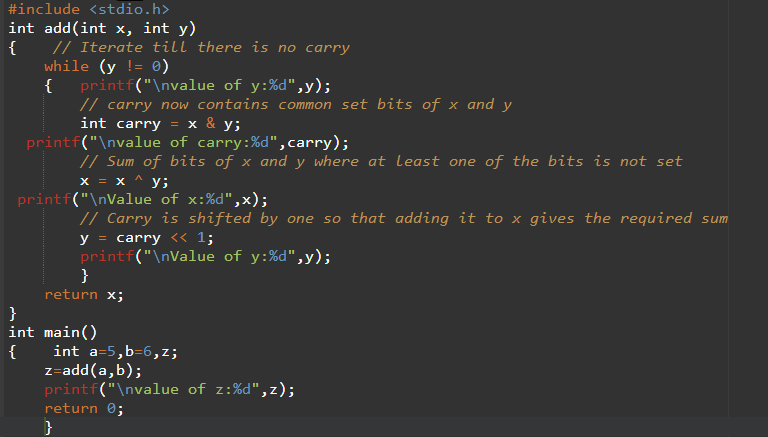
Add two numbers without using arithmetic operators


                Write a function Add() that returns sum of two integers. The function should not use any of the arithmetic operators (+, ++, –, -, .. etc).

Sum of two bits can be obtained by performing XOR (^) of the two bits. Carry bit can be obtained by performing AND (&) of two bits.
Above is simple HALF ADDER logic that can be used to add 2 single bits. We can extend this logic for integers. If x and y don’t have set bits at same position(s), then bitwise XOR (^) of x and y gives the sum of x and y. To incorporate common set bits also, bitwise AND (&) is used. Bitwise AND of x and y gives all carry bits. We calculate (x & y) << 1 and add it to x ^ y to get the required result.


Thursday, September 22, 2016

Google Allo

                          Image result for google allo
Introducing Google Allo, a smart messaging app that helps you say more and do more. Express yourself better with stickers, doodles, and HUGE emojis & text. Allo also brings you the Google Assistant, preview edition.

Respond without typing, in your style.

Smart Reply lets you keep the conversation moving with a single tap by suggesting text and emoji responses based on your personality. For example, it learns if you're more of a “haha” or “lol” person so the more you use Google Allo, the more “you” the suggestions become.

Shout, or whisper it, to get your point across.

Add more meaning to your words by adjusting the size of your text. When you need more than ALL CAPS to get your point across, simply slide up to shout, and down to whisper.

 Image result for google allo

Turn any photo into a work of art.

Get creative with the photos you send by doodling on them or adding text. Draw a smiley face, turn your friends into memes, and mix in some color.


Say it all with the perfect sticker.

Stickers in Google Allo are designed by independent artists and studios from around the world. From Drama Llama to Food Party, add some fun to the conversation when words aren't enough.


Get help from your Google Assistant without leaving the conversation.

Your Assistant can suggest restaurants nearby or movies to check out, right in your conversation. Find videos to share, get directions, and seek answers together with your friends. Just add @google, and your Assistant is ready to help.

Chat one-on-one with your Google Assistant, whenever you need it.

Get the latest scores from the game. Find out how far you are from the airport, and when your flight leaves. You decide what to share with your Assistant, and the more you use it, the more useful it gets

Say it privately in Incognito mode.

Start an incognito chat to send a message with end-to-end encryption. Incognito mode also comes with expiring chats so you can control how long your messages stick around and private notifications to help keep your chats more discreet.

Chat in private with Incognito mode

By chatting in Incognito mode, you can have a more private and secure conversation with another person in Google Allo

Start a chat in Incognito mode

  1. Open Allo.
  2. Tap New Chat New chat and then Start incognito chat Incognito mode.
  3. From the Contacts list, tap the person's name you want to start a chat with. You can also search for the person's name or number.

What happens in Incognito mode

  • You won't be able to preview your message in the Allo conversation list. You'll just see that you or the other person "sent a message."
  • Notifications won't display who sent the message or its content. If you want to turn off notifications entirely, go to Menu Menu and then Settings and then Notifications.
  • Your chats are end-to-end encrypted and can only be seen by you and the person you're chatting with. Google can't read any of your messages, so you won't see any Smart Reply or Google Assistant features.
  • When you receive a sticker from a sticker pack that you don’t have, Allo will download it securely from Google’s servers, but without using end-to-end encryption.

Set messages to expire

In incognito mode, you can set the messages to disappear after a period of time. The default period is 1 hour, but you can change it.
  1. Open Allo.
  2. Tap New Chat New chat and then Start incognito chat Incognito mode.
  3. In the top right corner, tap the timerTimer.
  4. You can choose to never expire your messages. Or choose after how long you want your messages to disappear: Never, 5 seconds, 10 seconds, 30 seconds, 1 minute, 1 hour, 1 day, or 1 week.
    • For the sender: The timer starts when the message is sent.
    • For the receiver: The timer starts when the message is read.
Within the same chat, you and the recipient share the same timer setting. But you can set a different timer each time you start a new chat.
Important: Allo users who receive your messages can use other ways to save them, like taking a screenshot or by taking a photo.

.


Friday, September 16, 2016

Why Node.js ?

Why Node.js ?
Hottest new technology.
-> Node.js is JavaScript running on the Server.
-> Runs on Chrome V8 JavaScript engine.
-> Its Non blocking and Event driven.
-> Faster than PHP.
-> Does not need additional Server stack such as Apache or NGINX, It has inbuilt http module.
-> JavaScript is easier to learn.
-> Inbuilt Package Manager to install modules.
-> JSON is easier to Use. Android Login Registration System with Node.js and MongoDB

Teleprompter

  • A teleprompter is a display device that prompts the person speaking with an electronic visual text of a speech or script. Using a teleprompter is similar to using cue cards. The screen is in front of, and usually below, the lens of a professional video camera, and the words on the screen are reflected to the eyes of the presenter using a sheet of clear glass or a specially prepared beam splitter. Light from the performer passes through the front side of the glass into the lens, while a shroud surrounding the lens and the back side of the glass prevents unwanted light from entering the lens.

  • Because the speaker does not need to look down to consult written notes, he appears to have memorized the speech or to be speaking spontaneously, looking directly into the camera lens. Cue cards, on the other hand, are always placed away from the lens axis, making the speaker look at a point beside the camera, which leaves an impression of distraction.


  • The word TelePrompTer, with internal capitalization, originated as a trade name used by the TelePrompTer Company, which first developed the device in the 1950s; it is now a genericized trademark. Autocue, a United Kingdom manufacturer of teleprompters, also finds its trademark used in a generic fashion in Commonwealth countries and some European countries.

  • Modern teleprompters for news programs consist of a personal computer, connected to video monitors on each professional video camera. In certain systems, the PC connects to an external scroll device over IP to offer greater flexibility in setup, distances and cabling. The monitors are often black-and-white monochrome and have the scanning reversed to compensate for the reflection of the mirror. A peripheral device attached to the serial port has a knob that can be turned to speed up, slow down, or even reverse the scrolling of the text. The text is usually displayed in white letters on a black background for the best readability, while cues are in inverse video (black on white). Difficult words (mainly international names) are spelled out phonetically,[8] as are other particulars like "Nine-eleven" (to specify that the event 9/11 should not be pronounced "nine-one-one", for example).

  • With the development of inexpensive teleprompter software applications as well as free Web-based teleprompter applets, many different disciplines are now using teleprompters to help them deliver sermons, deliver speeches, and to create quality audio recordings. Unlike their more advanced counterparts, these entry level products work on desktop computers, laptop computers, and even tablet computers to enable the speaker to control the rate and flow of their speech. They are also used by many different organizations and schools to deliver prewritten information by relative novices. They are usually called "personal teleprompters."

Thursday, September 15, 2016

Apple's iOS 10


Apple's iOS 10 can be downloaded for free on a wide range of devices. Don't forget to backup your iOS device before you download and install iOS 10. It will be available in India at 10.30pm on September 13. If you live elsewhere, check out our post on the full list of iOS 10 release times across the world.

While iOS 10 public beta 7 and the release candidate version have been quite stable for us, the final version could have a few bugs that will be fixed in later updates. If you'd rather wait for that, then stop reading now. However if you are like us and always prefer updating to the latest version as soon as it is released, read on.

Will my iPhone, iPad, or iPod touch get iOS 10?
Apple has announced iOS 10 updates for the following devices:

iPhone 6s
iPhone 6s Plus
iPhone 6
iPhone 6 Plus
iPhone SE
iPhone 5s
iPhone 5c
iPhone 5
iPad Pro 12.9-inch
iPad Pro 9.7-inch
iPad Air 2
iPad Air
iPad 4th generation
iPad mini 4
iPad mini 3
iPad mini 2
iPod touch 6th generation
If you have any of these devices, you can install iOS 10. The iPhone 7 and iPhone 7 Plus ship with iOS 10. Follow the steps below to install iOS 10 on your iOS device.


How to download and install iOS 10
If you have enough free space on your iOS device you can update easily via these steps.

Go to Settings > General > Software Update.
Tap Download and Install.
When the download is complete, tap Install and tap Agree when Apple shows you its Terms and Conditions.
Your iOS device will restart and iOS 10 will be installed.
Download iOS 10 via iTunes
If you don't have enough free space on your iOS device, you can install the update via iTunes. Here's how.

If you don't have iTunes installed on your PC, first download and install it.
Open iTunes.
Connect the iOS device to your PC or Mac.
In iTunes select your device's icon on the top bar.
Click the Summary tab and then click Check for update.
Now click Download and update.
Follow the simple on-screen instructions to install iOS 10.Photo